How to Make a Coloring Page From a Photo (Free Methods)
Quick answer
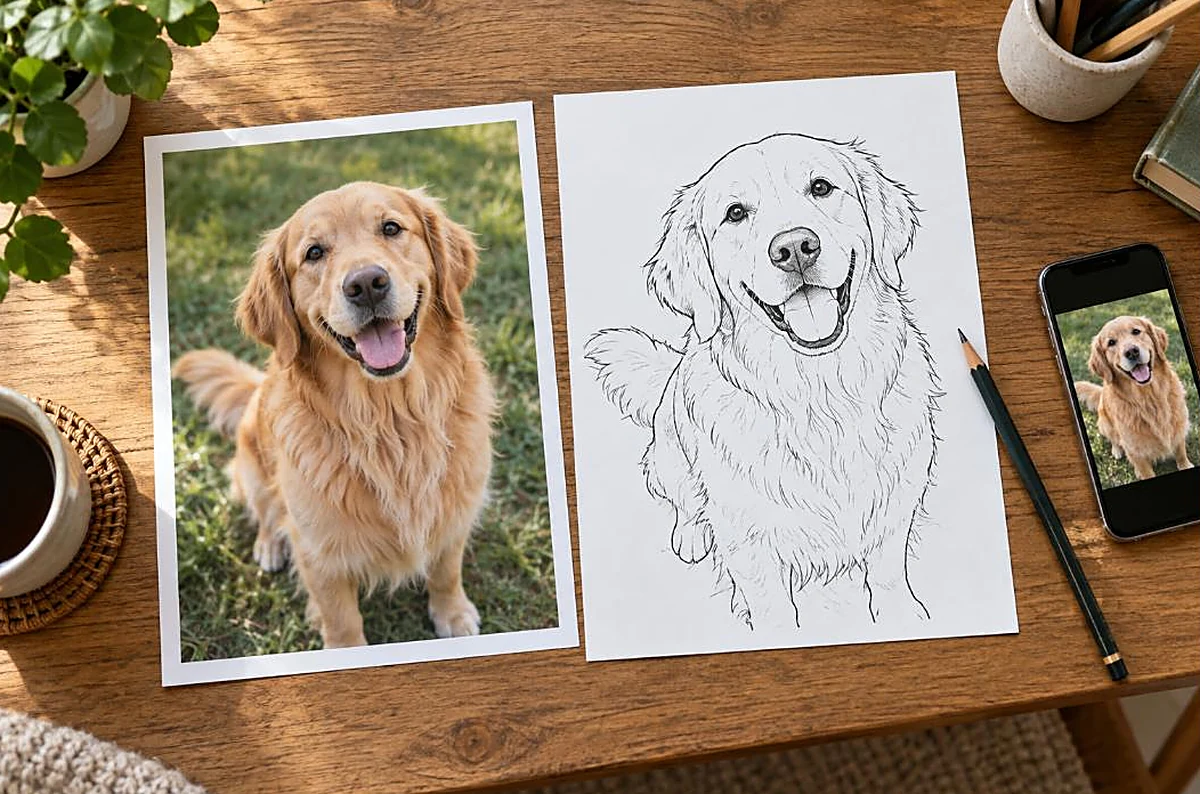
To make a coloring page from a photo, convert the image to simple black outlines using an edge-detection or “line art” effect in a photo editor or app, then clean it up so only the clearest lines remain. High-contrast photos with a clear subject work best. Save the outline as a PDF or PNG and print it on plain paper to color.
By the TheColoringPages.net team. Reviewed for accuracy, September 2026.
This guide to Coloring Page From Photo gives clear, practical answers, drawing on line art and years of hands on coloring.
Turning a favorite photo into a coloring page is a fun, personal project. Imagine coloring a page made from a photo of your pet, your family, or a favorite place. It is easier than you might think, with free online tools, AI generators, and simple editing methods that convert a photo into line art ready to color. This guide walks through the methods, from easiest to most hands on.
Quick answer: Turn a photo into a coloring page by converting it to line art. Use a free online photo to coloring page tool or AI generator, or do it manually in an editor with an edges or outline filter. Choose a high contrast photo, convert it, clean up stray lines, then print. The result is a personal coloring page from your own image.

What you need: a clear photo
Before converting, choosing the right photo makes a big difference to the result.
Start with a clear, high contrast photo, since these convert to line art best. A photo with a clear subject, good lighting, and strong contrast between the subject and background gives clean, recognizable line art. A well lit photo of a single subject, like a pet or a person, against a simple background works especially well. The clearer the photo, the better the coloring page.
Avoid photos that are blurry, dark, cluttered, or low contrast, since these convert to messy, unclear line art. A busy background, poor lighting, or an unclear subject leads to a confusing coloring page with too many stray or missing lines. Simple, clear, well lit photos give the best results. If your photo is not ideal, you can sometimes improve it by cropping to the subject or adjusting brightness and contrast before converting.
Consider the subject too. Simple, bold subjects convert to better coloring pages than complex, detailed scenes. A single pet, a face, a flower, or a clear object works well, while a crowded scene may be too complex. Choosing a suitable photo, clear, high contrast, with a simple bold subject, sets you up for a good coloring page. With the right photo, the conversion methods below give pleasing results. Our guide on what makes good line art covers what to aim for.
Method 1: free online converters
The easiest way to turn a photo into a coloring page is a free online converter.
Many free websites and tools convert a photo into a coloring page automatically. You upload your photo, the tool converts it to line art, and you download the result ready to print. These converters do the work for you, applying edge detection or similar processing to turn the photo into outlines. This is the simplest method, needing no software or skill, just uploading and downloading.
To use one, find a free photo to coloring page converter online, upload your clear, high contrast photo, and let it convert. Review the result, and if it looks good, download and print it. Some converters offer settings to adjust the level of detail or line thickness, which you can tweak for a better result. The convenience of these tools makes them a popular first choice.
Results vary by tool and photo, so if one converter gives a poor result, try another, or improve your photo first. The best converters produce clean, recognizable line art from a good photo. For a quick, free, no skill way to turn a photo into a coloring page, online converters are ideal. They handle the technical work, giving you a ready to print page in moments. Our guide on how to print coloring pages at home covers printing the result.
Method 2: AI coloring page generators
AI generators are a newer, often higher quality way to create coloring pages from photos.
AI coloring page generators use artificial intelligence to convert a photo, or a text prompt, into line art. For photos, they analyze the image and generate clean line art from it, often with better results than basic converters, since AI can interpret the image more intelligently. You upload your photo, the AI generates the coloring page, and you download it. Our guide on AI coloring page generators covers these tools in depth.
AI generators can produce cleaner, more coloring friendly line art from photos, handling detail and simplification well. Some let you adjust the style or detail level, giving control over the result. The AI can often produce a clearer, more appealing coloring page than simple edge detection, which is why these tools have grown popular. Many free AI generators are available to try.
As with converters, results depend on the tool and photo, so try a good tool with a clear photo for the best outcome. Be aware of any copyright or usage terms, and only convert photos you have the right to use, as covered in our guide on copyright and coloring pages. For a modern, often superior way to turn a photo into a coloring page, AI generators are worth trying. They combine ease with quality. Our collection of free printable coloring pages offers ready made pages too.

Method 3: manual conversion in an editor
For more control, you can convert a photo to line art manually in a photo editor.
Photo editing software, including free options like GIMP, and paid ones like Photoshop, can convert a photo to line art using filters. The general approach is to desaturate the photo to black and white, then apply an edge detection or find edges filter, which turns the photo into outlines. Adjusting the levels or threshold refines the result into clean line art. This gives you control over the outcome that automatic tools may not.
The manual method takes more skill and effort but allows fine tuning. You can adjust the contrast, clean up the edges, remove unwanted lines, and control the level of detail, producing a customized, high quality coloring page. This suits people comfortable with photo editing who want the best, most controlled result. Free tutorials for specific software walk through the exact steps.
Manual conversion is the most hands on method, best for those who want control and are willing to learn the editing steps. For a one off page, automatic tools are easier, but for the best quality or a special project, manual editing gives superior control. Whichever method you choose, the goal is the same, clean line art from your photo, ready to color. Our guide on what makes good line art covers the goal.
Cleaning up the result
Whatever method you use, cleaning up the converted line art improves the final coloring page.
Converted line art often has stray marks, broken lines, or unwanted detail, especially from a less than perfect photo. Cleaning these up gives a better coloring page. You can do this in a photo editor, erasing stray marks, closing broken outlines, and removing cluttered background lines. This tidying turns a rough conversion into a clean, pleasant coloring page. Even a quick cleanup noticeably improves the result.
Focus on the key improvements: remove messy background lines to leave a clear subject, close any gaps in important outlines so the areas are defined, and erase stray or confusing marks. These fixes make the page much easier and more pleasant to color. If the conversion is very messy, it may be quicker to try a different photo or method than to clean up extensively. Good input gives less to clean up.
For automatic tools that produce a fairly clean result, little cleanup may be needed, while manual or messy conversions benefit from more. Balancing effort and result, aim for clean, clear line art with defined areas and no distracting clutter. A little cleanup, matched to the conversion quality, gives a good coloring page from your photo. Then it is ready to print and color. Our guide on how to color neatly covers coloring the finished page.

Printing and using your coloring page
Once you have your line art, printing and using it completes the project.
Print your photo coloring page like any other, downloading or saving the line art and printing it with the right settings. Set scaling to fit the page, choose portrait or landscape to match the image, and print on suitable paper. Our guide on how to print coloring pages at home covers the settings. Your personal coloring page, made from your own photo, is then ready to color.
A photo coloring page makes a lovely personal project or gift. Coloring a page made from a photo of a loved one, pet, or special place is meaningful, and it makes a thoughtful, personal gift or keepsake. You might make coloring pages from family photos for a personalized coloring book, or from a pet photo for a child to color. The personal touch makes these pages special, turning an ordinary photo into a keepsake someone can spend time bringing to life with color.
Making coloring pages from photos also lets you create custom pages for any purpose: a personalized party favor, a keepsake of a special event, or a unique gift. The ability to turn any photo into a coloring page opens up creative, personal possibilities beyond standard coloring pages. You could make a coloring book of a family holiday, a page of a child’s drawing brought to clean line art, or a portrait of a beloved pet. With the free methods in this guide, anyone can create custom coloring pages from their own photos. It is a fun, rewarding, personal project. Our collection of free printable coloring pages offers ready made pages alongside your custom creations.
Frequently asked questions about coloring page from photo
How do I turn a photo into a coloring page?
Convert the photo to line art using a free online converter, an AI coloring page generator, or manual editing with an edges filter in software like GIMP. Choose a clear, high contrast photo, convert it, clean up stray lines, then print the result.
What photos work best for coloring pages?
Clear, high contrast photos with a simple, bold subject and good lighting work best, since they convert to clean, recognizable line art. Avoid blurry, dark, cluttered, or low contrast photos, which give messy results. Crop and adjust the photo first if needed.
Are there free tools to make coloring pages from photos?
Yes. Free online photo to coloring page converters and many free AI coloring page generators can convert a photo to line art automatically. Free photo editors like GIMP also allow manual conversion. These let you make coloring pages from photos at no cost.
Can AI turn a photo into a coloring page?
Yes. AI coloring page generators analyze a photo and generate clean line art from it, often with better results than basic converters. You upload the photo, the AI generates the page, and you download it. Many free AI generators are available.
Can I make coloring pages from family photos?
Yes. You can convert family photos into personal coloring pages to color or give as gifts. Only convert photos you have the right to use, and enjoy creating meaningful, personalized coloring pages from your own images of loved ones, pets, or special places.
The takeaway on coloring page from photo
Turning a photo into a coloring page is a fun, personal project made easy by free tools. Choose a clear, high contrast photo, then convert it to line art using a free online converter, an AI generator, or manual editing with an edges filter. Clean up stray lines for a better result, then print and color your custom page. Made from your own photos of loved ones, pets, or places, these personal coloring pages are meaningful to color and make thoughtful gifts. With these free methods, anyone can create custom coloring pages, turning cherished photos into pages worth spending time on.
Ready to color, custom or ready made? Browse our free printable coloring pages across countless subjects. Every one is free to download and print.